
Start with the event someone is planning
I begin with the enquiry the business wants to receive. A couple looking for a wedding venue needs different information from someone arranging a company offsite. A hotel offering rooms and meeting space has another decision to explain. Putting every service into the same short paragraph leaves visitors to work out the differences themselves.
Write down the types of events you can support, the areas you serve and who handles the enquiry. Then give each important service a clear home on the website. Describe the practical fit: the setting, the kind of occasion, the facilities people should ask about and the planning support available. Make seasonal restrictions or dependencies clear when they affect the decision.
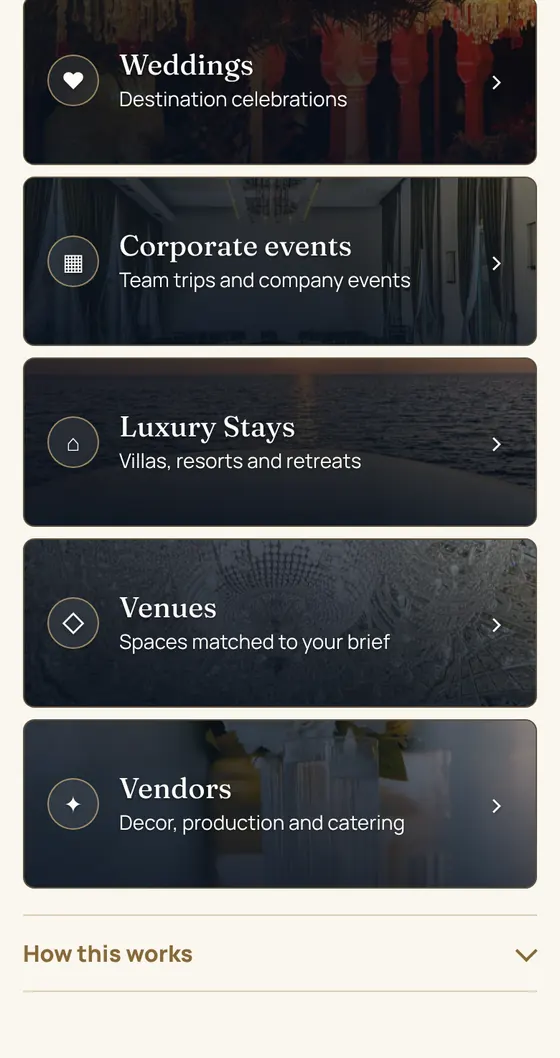
For Zarastays, I built the digital presence around corporate events, weddings, venues, vendors and stays. These are distinct starting points. The website helps a visitor recognise their own brief before asking them to contact the team. You can inspect that structure on the public Zarastays website.
Help local searches reach a useful page
A service page should describe where the work happens in language a buyer recognises. If you work across Delhi NCR, explain how enquiries from Gurugram, Delhi and nearby areas are handled. Add a separate location page only when you have something useful and accurate to say about that location. Repeating the same paragraph with different place names gives people little help.
Connect your website and Business Profile with the same business name, service description and contact route. Choose images that show your actual offer. Keep information current when a venue changes its facilities or an event service changes its scope. Local discovery becomes more useful when the visitor sees a consistent story after clicking through.
I also check page titles, headings and internal links. A wedding enquiry should arrive at information about weddings. A corporate planner should see the meeting and stay context they need. The page can then answer the next question without sending everyone back to the homepage.
Show the practical details behind the pictures
Strong photographs help a visitor understand a space, but the surrounding information carries the enquiry forward. Explain what each image shows and which decisions still need a conversation. If a photograph represents a past event, identify it honestly. If availability depends on the chosen date, make that clear before someone assumes a booking can be confirmed online.
Useful content answers ordinary planning questions: how to choose a setting, what information to send, which services are included and what happens after an enquiry. For corporate events, that might include meeting requirements and accommodation. For celebrations, it might include the flow between ceremonies, guest travel and the venue discussion.
I keep claims tied to work people can inspect. On a portfolio page, screenshots can show how the journey is arranged. On the venue website itself, current images and accurate descriptions help buyers assess fit. Neither needs an invented success story to be useful.
Give customers and partners different routes
A customer looking for an event and a venue offering its services should not have to untangle the same form. They bring different information. A customer has a brief; a partner has a property or service to explain. Separate routes help the business understand what kind of response is needed.
The Zarastays planning portal starts with the purpose of the enquiry, including weddings, corporate events, stays, venues and vendors. The partner portal asks suppliers to introduce what they offer. I built these as connected parts of the brand’s digital presence.
For your own business, begin with the information the team needs to give a useful reply. Keep labels familiar. Explain why you need information that feels detailed or personal. Let people correct an answer without starting again. A short journey still needs to produce enough context for the person following up.
Connect content and advertising to the brief
Use each piece of content to answer a decision that happens before an enquiry. A venue walkthrough can explain how spaces connect. A planning guide can help someone prepare a brief. A film can show the mood and setting of an occasion. Give the viewer a relevant page to visit when they want more detail.
When advertising is part of the scope, match the promise in the advert to the landing page. If the creative discusses a corporate offsite, the page should explain that service and how to enquire about it. Review the whole route on a phone, including the form, confirmation and contact alternatives.
This is also how I think about education journeys. Sagechord’s digital presence lets learners explore free lessons before considering a programme. The visitor’s decision is different, but the principle carries across: offer useful context, then make the next step fit what they have just seen.
Make follow-up part of the website project
An enquiry process continues after the submit button. Agree who receives a new brief, who responds and where the status is recorded. Tell the visitor what will happen next. A confirmation should make it clear that the enquiry reached the business and whether someone will reply or the visitor should choose another action.
Zarastays’ digital work includes a private lead dashboard alongside its public website and portals. That is a delivery example, rather than a claim about bookings. The purpose is to give the team a place to work with incoming enquiries. The design of that workflow should follow how the business actually handles a brief.
Review source information alongside the quality of each conversation. A click on a contact button and a useful planning enquiry describe different stages. Keep that distinction in your reports. Use what the team learns to improve explanations, remove confusing questions and decide what content is worth producing next.
Choose the next piece of work
If your website leaves the offer unclear, begin with the service structure and enquiry route. If the website explains the work well but content is inconsistent, focus on a publishing and review rhythm. If briefs are arriving but getting lost between people, define the follow-up process before adding another channel.
I use a written scope to connect those decisions. It names what I will build, what the business needs to provide and how the finished journey will be checked. My four packages cover planning, a digital presence build, ongoing growth work and custom tools. The right starting point depends on the gap in your current journey.
Questions, answered.
Does every venue need a separate landing page?
A separate page helps when the venue has enough distinct information to support a real decision. Include its setting, relevant services and enquiry route. Keep shared information easy to maintain, and avoid creating pages that repeat the same copy with only a venue name changed.
What should an event enquiry form ask?
Ask for the details your team needs to respond usefully, such as the type of event, preferred timing and contact information. Explain the next step. Keep customer enquiries separate from supplier introductions when the follow-up process differs.
Should social posts send everyone to the homepage?
Use the page that best continues the subject of the post. A venue feature can link to its relevant detail page, while an event-planning post can lead to the planning route. Check that the destination makes sense on a phone.
Can this approach promise bookings?
No. It creates a clearer route from discovery to a conversation. Availability, the offer, commercial terms and the team’s follow-up all affect the eventual booking. Review the evidence from real enquiries before deciding what to change.
